MIDI (Musical Instrument Digital Interface) is a standard file format for representing musical performances
in terms of notes, timings, and velocities. Unlike digital audio, which only stores information describing waveforms, MIDI gives you complete control to
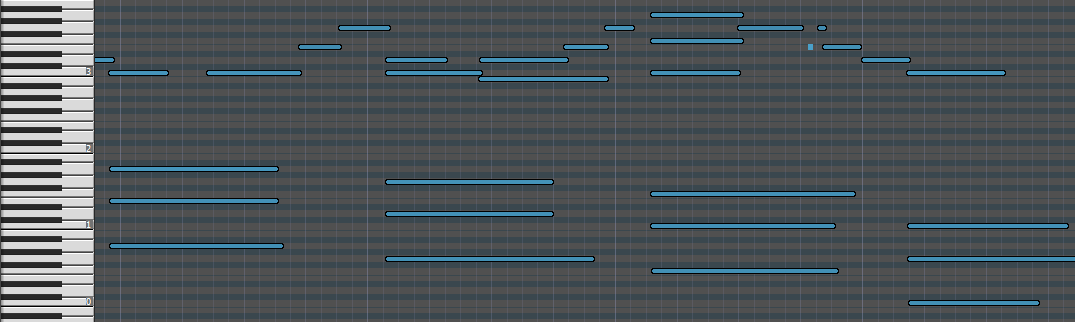
edit the pitches and timings of every note. A MIDI piano roll view for simple editing.
MIDI gives you so many options. Have you ever played one blatantly wrong note on a guitar
recording? With MIDI, just slide the note to the correct pitch. Did you play it too slowly?
With MIDI, change the tempo with one click. Don't have your favorite amp or guitar on hand?
No problem. Play your MIDI file through virtual instrument software to sound like a completely different guitar and rig. Easily click and drag to edit notes in a MIDI piano roll.
BPM stands for "beats per minute" and is a measure of tempo. In most cases, you can stick with the default of 120 BPM, since DAWs default to 120 BPM unless otherwise specified (see page 143
of the MIDI 1.0 specification). If your project uses a different BPM, make sure to specify it inside the dropzone above before uploading your audio file. This will ensure that your MIDI file lines up with the audio in your project. If your project switches between multiple BPM values, make sure to turn off time stretching and/or use a
sample-based MIDI track (not tick-based) to ensure the MIDI timing matches your original
audio.
Please reach out to contact@eldoraudio.com and we'll do our best to help you resolve any issues.
No, by design. Most models that attempt pitch bends do them poorly, and it throws off the tuning of the whole transcription. We'd rather give you the most accurate model possible and let you add pitch bends manually where you need them.
This is our clean guitar model. It's optimized for steel-string, nylon-string, clean electric, and jazz guitar.
We're building a dedicated model for distorted and overdriven electric guitar, which we plan to release later.
If you run distorted guitar through this model today, expect noticeably lower accuracy.
Not yet. Right now the converter only outputs standard MIDI files (.mid). You can import
MIDI into Guitar Pro, MuseScore, or most other tablature and notation software and re-export
from there. Native Guitar Pro and MusicXML export are on our roadmap, so keep an eye out.
The model is optimized specifically for solo guitar, which is why it handles fast passages and
dense chords more accurately than a general-purpose tool. It also does a solid job picking a
guitar part out of a mixed recording, and performs surprisingly well on other instruments like
harp, violin, and piano. If you know your recording is piano, you'll get better results from our Piano Audio to MIDI Converter, which
is trained specifically for piano. And if you want to make absolutely sure the guitar part is
isolated before transcribing a full mix, run it through our Stem Splitter first. If you need dedicated
multi-instrument transcription, see our Audio to MIDI Converter.
You can upload an audio file up to 100 MB in size. If your file is too large (often the case with wav files), you can use an online converter
such as cloudconvert to first convert to mp3 for a much smaller file size. Free users receive the first 30 seconds converted at no cost. Upgrade to a Flex or Pro plan to convert
up to 30 minutes per file.